
Enable a harness
A harness is an AI coding tool on your machine — a signal source. Trove auto-detects the harnesses you have installed (17 are supported, from Claude Code and Antigravity CLI to Cursor, Cline, Aider, and GitHub Copilot CLI) and can turn telemetry on for each one with a single toggle.
Enabling a harness does one of two things depending on how that tool reports data:
- Native OTel harnesses (Claude Code, Antigravity CLI, Codex, Qwen, OpenCode, Cursor IDE) already speak OTLP. Trove just flips the right env/config flags so they point at the local collector.
- Best-effort harnesses (Cline, Aider, GitHub Copilot CLI) don’t emit OTel natively. Trove installs a lightweight watcher (a filesystem monitor) and/or a shell-rc wrapper that derives equivalent OTLP records from the tool’s on-disk logs. Those derived records answer the same queries as their native peers.
Either way the change is atomic, idempotent, and reversible.
Enable it
Section titled “Enable it”-
Open Trove and go to the Harnesses tab. Each detected tool appears as a row with a coverage badge and an enable/disable toggle.
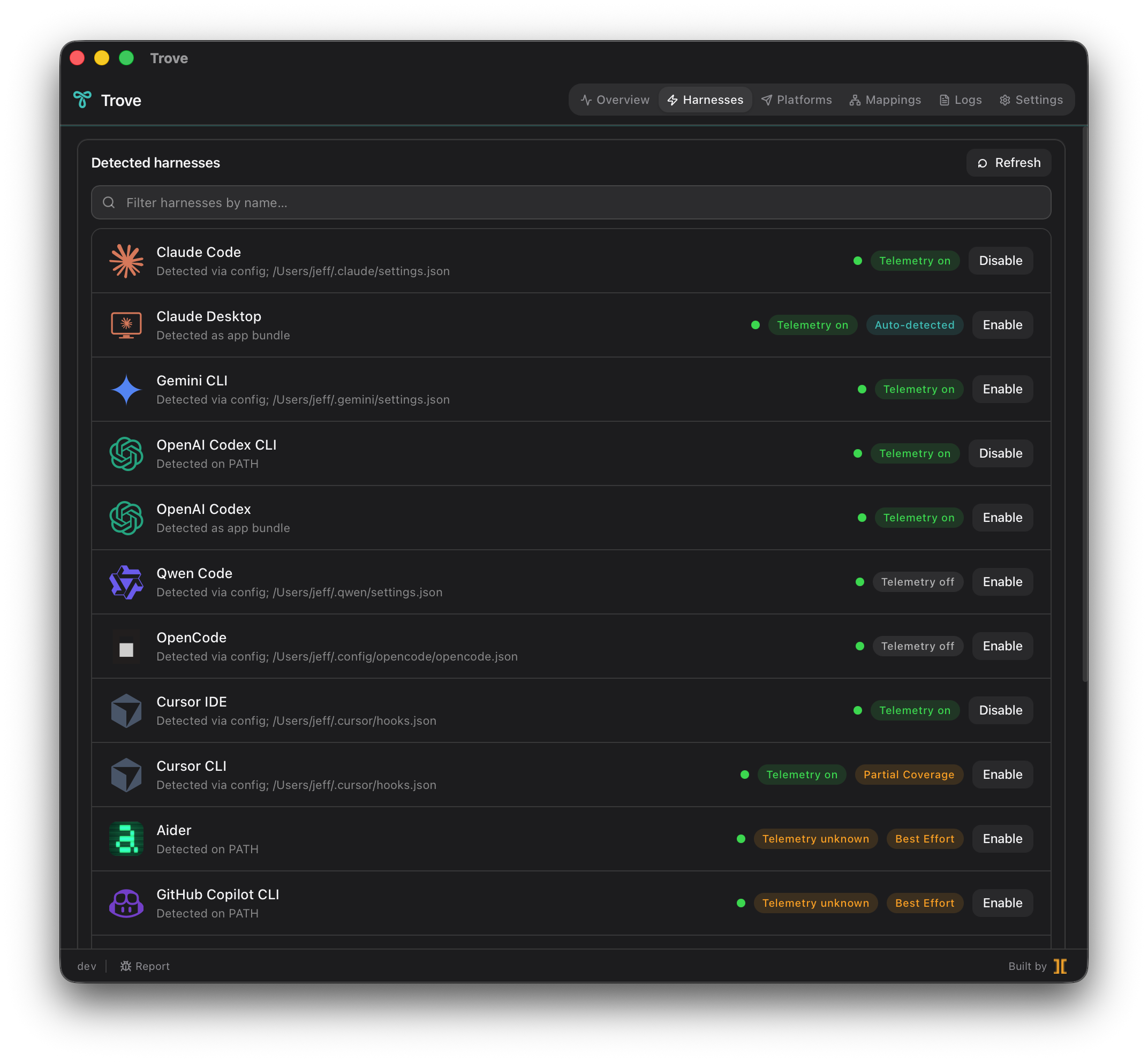
-
Find the harness you want and flip its toggle on.
-
Trove writes the patch to that harness’s config file (or shell rc, for wrapper-based harnesses). The write is atomic — temp file, fsync, rename — and the original is backed up first. Re-enabling an already-enabled harness is a no-op.
What the managed-region patch looks like
Section titled “What the managed-region patch looks like”Trove never scatters edits through your config. Everything it writes goes inside a single sentinel-bracketed managed region — a clearly marked block fenced by Trove sentinel comments. Revert finds that exact block and removes it byte-for-byte, so your file returns to its pre-Trove state with nothing left behind.
Conceptually, an edit to a harness config looks like this:
{  "your": "existing settings stay untouched",
  // >>> TROVE MANAGED REGION — do not edit by hand <<<  "telemetry": {    "enabled": true,    "otlpEndpoint": "http://127.0.0.1:4317",    "otlpProtocol": "grpc",  },  // <<< END TROVE MANAGED REGION >>>}
For a wrapper-based harness the managed region lands in your shell rc
(for example ~/.zshrc) instead, defining a shell function that re-execs
the real binary and logs one structured line per invocation, which the
watcher turns into OTLP.
Confirm OTLP is flowing
Section titled “Confirm OTLP is flowing”-
Run a single turn through the harness — one prompt, one response.
bash claude -p "say hi in one word"bash agy -p "say hi in one word"Just use the tool normally for one quick interaction. -
Open the Logs tab and watch the live collector tail. You should see an OTLP batch arrive tagged with this harness’s
harness.idresource attribute. -
Switch to the Overview tab. The data-flow chart shows the harness as an active source feeding the collector, and the Platforms tab’s health pill for your backend should pulse green.
-
Confirm it landed at the destination by running a query in your backend filtered on
harness.id(for exampleharness.id = "claude-code"). One recent row means the full path works end to end.
Disable and revert
Section titled “Disable and revert”Turning a harness back off is the inverse of enabling it, and it’s clean:
-
On the Harnesses tab, flip the harness’s toggle off.
-
Trove locates the sentinel-bracketed managed region and removes exactly what it wrote — the file is restored byte-for-byte to its pre-enable state. No orphaned env vars, no half-applied config, no CLI that keeps POSTing to localhost after you thought you were done.
-
For watcher/wrapper harnesses, Trove also stops the filesystem watcher and removes the shell-function block from your rc file.
This reversibility is the whole point: every “Enable” is something you can take back with one click, which is exactly what makes it safe to try Trove across a whole team.