The Harnesses tab
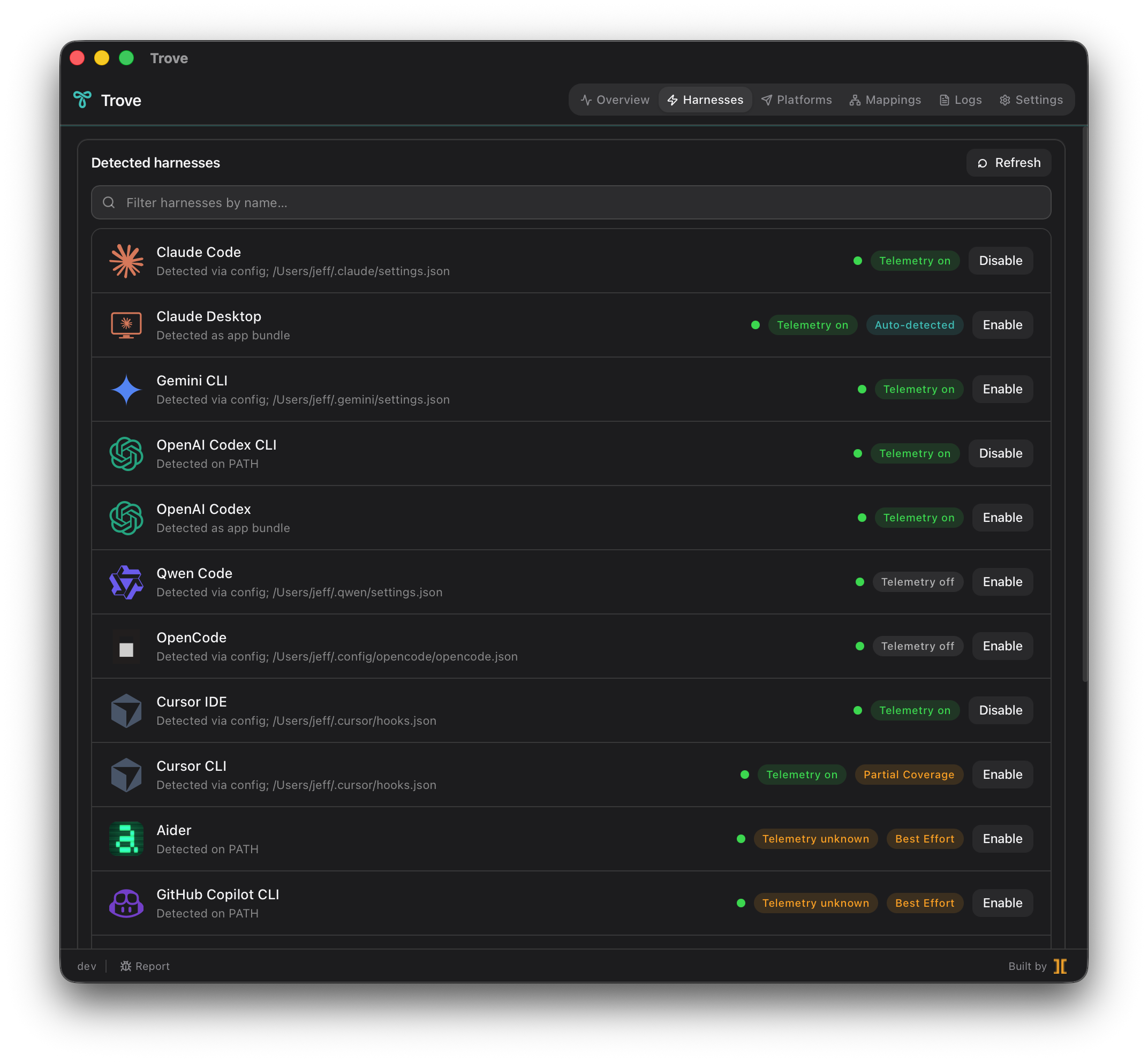
A harness is an AI coding tool that produces telemetry — Claude Code, Antigravity CLI, Cursor, Cline, and so on. The Harnesses tab is where Trove shows you which ones it found on your machine and lets you turn telemetry on or off for each one, one row at a time.
Auto-detection
Section titled “Auto-detection”The moment Trove starts, it sweeps the standard install paths for every supported tool and surfaces whatever is on disk. You do not point Trove at anything — if a harness is installed where its vendor puts it, Trove finds it and lists it. Tools that aren’t installed simply don’t appear (or appear dimmed, depending on the build), so the list reflects your actual machine.
Trove supports 17 harnesses today, spanning native-OTel tools, partial- and best-effort adapters, and setup-guide-only entries:
Claude Code, Claude Desktop, Antigravity CLI, Codex CLI, Codex Desktop, Qwen Code, OpenCode, Cursor IDE, Cursor CLI, Cline, Aider, GitHub Copilot CLI, Junie CLI, Droid, Kimi Code CLI, Devin, ForgeCode, and Sentinel.
Per-row Enable / Disable
Section titled “Per-row Enable / Disable”Each detected harness is a row with a single toggle.
-
Click Enable on a harness row. Trove writes a managed region into that tool’s config file — a block bracketed by sentinel comments that flips on the tool’s OTLP export and points it at the local collector.
-
Watch the telemetry pill turn green. Within about five seconds of the tool emitting its first signal, the row’s pill goes green and the harness appears in the Overview data-flow chart.
-
Click Disable to revert. Trove removes the managed region, restoring the config file byte-for-byte to what it was before. No orphaned env vars, no half-applied state, no “I removed Trove but my CLI still POSTs to localhost.”
Coverage badges
Section titled “Coverage badges”Not every tool speaks OpenTelemetry the same way. Each row carries a coverage badge telling you how Trove captures that harness — which sets your expectations for what data you’ll see:
- Native OTel — the tool emits OTLP itself. Trove just flips the right config/env flags and routes the stream through the collector. Highest fidelity: exact tokens and cost where the tool reports them.
- Best Effort — the tool does not emit OTel natively. Trove installs a lightweight watcher (a filesystem monitor) and/or a shell-rc wrapper that derives equivalent OTLP records from the tool’s on-disk logs or invocations. Events and durations are reliable; tokens and cost are estimated.
- Partial — only a subset of the tool’s events is observable. Cursor CLI, for example, exposes a subset of Cursor’s hook events (shell-exec only), so its coverage is narrower than Cursor IDE’s.
A fourth class, Setup guide, covers harnesses Trove can’t auto-patch yet (Junie CLI, Droid, Kimi Code CLI, Devin, ForgeCode) — the tab links you to manual setup instructions instead of offering a one-click toggle.
| Badge | Example harnesses | What you get |
|---|---|---|
| Native OTel | Claude Code, Antigravity CLI, Codex, Qwen Code, OpenCode, Cursor IDE | Exact events, tokens, cost (where reported) |
| Partial | Cursor CLI | A subset of events (e.g. shell exec) |
| Best Effort | Cline, Aider, GitHub Copilot CLI | Derived events + durations; estimated tokens/cost |
| Setup guide | Junie CLI, Droid, Kimi Code CLI, Devin, ForgeCode | Manual setup instructions |
What lands in your backend
Section titled “What lands in your backend”Every enabled harness — native or best-effort — tags its telemetry with the same
resource attributes (harness.id, harness.name, service.name, and your
opt-in user.name / user.email). That harness.id is what lets you compare a
Claude Code turn against a Copilot CLI turn side-by-side in a single query, no
matter how different the two tools are under the hood.